Tracking Setup
GDPR vs CCPA: What Changes for Your Website Analytics
Tracking Setup · Privacy law
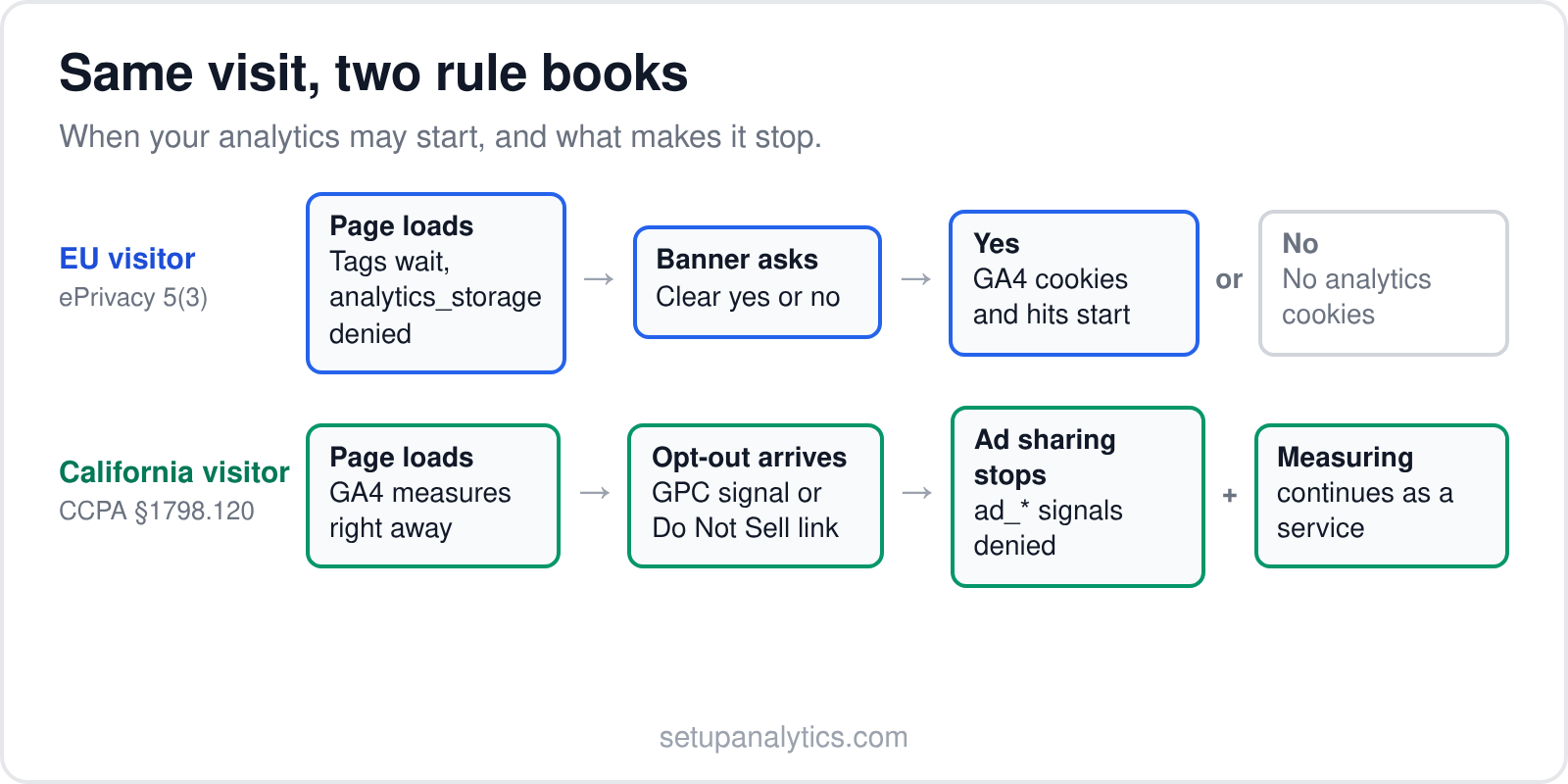
The short version of GDPR vs CCPA for website analytics is a question of timing. In the EU, analytics cookies wait until the visitor says yes (ePrivacy Directive Art. 5(3), GDPR Art. 4(11)). In California, your tags may run from the first page view. Your duty starts when a visitor opts out of the sale or sharing of their data, browser signal included (Cal. Civ. Code §1798.120, 11 CCR §7025).
| At a glance | GDPR (EU) | CCPA / CPRA (California) |
|---|---|---|
| Can you run GA4? | Yes, after consent | Yes, from the first page view |
| Consent before tracking? | Required, opt-in (ePrivacy Art. 5(3)) | Not required. Visitors opt out of sale or sharing (§1798.120) |
| Maximum fine | €20 million or 4% of worldwide annual turnover, whichever is higher (Art. 83(5)) | $2,663 per violation, $7,988 if intentional or involving a child under 16 (§1798.155(a), amounts adjusted on 1 January 2025) |
Last verified 2026-11-04 against the official texts of the GDPR, the ePrivacy Directive, and the CCPA statute and regulations.
GDPR vs CCPA: what changes for your analytics, row by row
| What your analytics touches | GDPR (EU) | CCPA / CPRA (California) |
|---|---|---|
| Who has to comply | Anyone who monitors the behavior of people in the EU, with no revenue or traffic threshold (Art. 3(2)(b)) | For-profit businesses doing business in California that pass one of three tests (§1798.140(d)(1)) |
| Whose data | People in the EU (Art. 3(2)) | California residents (§1798.140(i)) |
| Is a GA4 hit personal data? | Yes. Online identifiers count, with cookie IDs and IP addresses named as examples (Art. 4(1), Recital 30) | Yes. IP addresses, online identifiers and browsing history are all listed (§1798.140(v)(1)(A) and (F)) |
| Before the first hit | Consent for any cookie that is not strictly necessary (ePrivacy Art. 5(3)) | Notice at or before collection, no consent (§1798.100(a)) |
| When the visitor says no | Withdrawing consent must be as easy as giving it (Art. 7(3)) | Opt-out of sale or sharing, honored within 15 business days at most (§1798.120, 11 CCR §7026(f)(1)) |
| Browser privacy signal | No named signal. Objection by automated means is allowed (Art. 21(5)) | Global Privacy Control counts as a valid opt-out (11 CCR §7025(b) and (c)(1)) |
| Children | Consent from age 16, which member states may lower to 13 (Art. 8(1)) | No sale or sharing under 16 without an opt-in (§1798.120(c)) |
| How long you keep data | No longer than necessary, and the period goes into your notice (Art. 5(1)(e), Art. 13(2)(a)) | State the retention period and keep data no longer than reasonably necessary (§1798.100(a)(3)) |
| Access and deletion requests | One month, extendable by two more (Art. 12(3)) | 45 days (§1798.130(a)(2)(A)) |
| Who enforces | National supervisory authorities (Art. 51) | California Privacy Protection Agency and the Attorney General (§1798.155, §1798.199.90) |
Two rows decide most of your setup: the first hit and the browser signal. The rest belongs in your privacy notice, and both laws expect that notice to exist before data is collected.
The full legal summaries live in our registry cards for the GDPR and the CCPA / CPRA. This page covers only what each law does to a tag on your site.
Consent before the first hit, or an opt-out after it
In the EU, the consent rule for analytics cookies comes from the ePrivacy Directive. Storing or reading anything on a visitor’s device needs consent, unless it is strictly necessary for the service they asked for (Art. 5(3)).
The GDPR then sets the bar for that consent. It must be a clear affirmative action (Art. 4(11)). Silence and pre-ticked boxes do not count (Recital 32), and withdrawing must be as easy as agreeing (Art. 7(3)).
In practice, GA4 starts in consent mode with analytics_storage denied for EU visitors. It switches to granted only after a click on Accept, as shown in our consent mode setup guide.
California works the other way round. The CCPA has no consent rule for analytics at all. It regulates two things your tags might do with the data: sell it, or share it for cross-context behavioral advertising (§1798.140(ad) and (ah)).
Measurement on its own usually stays outside both. “Providing analytic services” on your behalf is a listed business purpose (§1798.140(e)(5)). A vendor bound by a service provider contract is not a third party you sell to (§1798.140(ag)).
Google’s terms follow the same split. Its restricted data processing page says Google Analytics acts as a service provider once you switch off data sharing with Google products and services.
The moment visitor data feeds ads that follow people to other sites, you are sharing. Targeting ads with activity collected across other businesses’ sites is exactly how the law defines cross-context behavioral advertising (§1798.140(k)).
Global Privacy Control: the signal California makes you honor
Global Privacy Control is a browser setting. When it is on, the browser sends the header Sec-GPC: 1 with every request and exposes navigator.globalPrivacyControl as true to scripts on the page.
The W3C specification is still a Working Draft, last published on 24 September 2026. California does not wait for it, because the CCPA regulations already define what counts as a valid signal.
If you sell or share personal information, you must treat the signal as a valid opt-out request for that browser (11 CCR §7025(b) and (c)(1)). Posting a “Do Not Sell or Share” link does not replace this duty (§7025(e)).
The regulations in force since 1 January 2026 also ask you to show the result. Your site must display whether it processed the signal, and the rule’s own example is the text “Opt-Out Request Honored” (§7025(c)(6)).
Expect more visitors to arrive with it switched on. Brave and DuckDuckGo send the signal by default and Firefox offers it in settings. From 1 January 2027, a new section of the CCPA requires browser makers to offer the setting (§1798.136).
Regulators already check for it. In September 2025 the California Privacy Protection Agency fined Tractor Supply $1,350,000. One listed violation was an opt-out mechanism that ignored signals such as Global Privacy Control.
Check your own browser: turn on JavaScript to run the check.
The check reads navigator.globalPrivacyControl in this tab. Nothing is sent anywhere and nothing is stored.
Honor GPC in consent mode
Put this block before the Google tag, next to your EU consent defaults. For California visitors with the signal on, it denies the three advertising signals and leaves measurement running.
<script>
window.dataLayer = window.dataLayer || [];
function gtag(){dataLayer.push(arguments);}
if (navigator.globalPrivacyControl === true) {
  gtag('consent', 'default', {
    'ad_storage': 'denied',
    'ad_user_data': 'denied',
    'ad_personalization': 'denied',
    'region': ['US-CA']
  });
  document.addEventListener('DOMContentLoaded', function () {
    var s = document.getElementById('gpc-status');
    if (s) s.textContent = 'Opt-Out Request Honored';
  });
}
</script>
The region parameter takes ISO 3166-2 codes. When two defaults overlap, Google applies the one with the more specific region, so US-CA wins over a default for the whole US.
The element with the id gpc-status can be a small line in your footer or privacy settings. A pop-up in response to the signal would break the frictionless option (§7025(f)(3)), while a quiet status line does not.
Non-Google tags ignore consent mode. In Google Tag Manager, you can create a Custom JavaScript variable that returns navigator.globalPrivacyControl === true and add it as a trigger exception on every ad pixel.
What to set in GA4 for each law
Most sites get visitors from both places, so set both and let the visitor’s region decide. Seven settings cover it.
- EU visitors: deny by default. Scope your consent defaults to the countries where you show the banner, using the same
regionparameter. Our multi-region init snippet is a ready starting point. - Pick a retention period and write it down. Standard GA4 properties keep user and event data for 2 or 14 months, and the setting trims only explorations and funnel reports. Put the period in your privacy notice, as both laws require.
- Check the transfer route. GA4 data goes to Google in the US. Transfers to organizations on the Data Privacy Framework List are covered by the EU adequacy decision of 10 July 2023 (Decision (EU) 2023/1795, Art. 1). Our page on international transfers covers the other routes.
- California: keep Google a service provider. In Admin → Account details, switch off the data sharing setting “Google products & services”. That is the condition Google names for acting as a service provider under US state privacy laws.
- California: switch off ads personalization if you never use it. Go to Admin → Data collection and modification → Data collection and open the Advanced Settings to Allow for Ads Personalization panel. Events from a switched-off region are marked as not eligible, and reports keep all the data.
- If you do share, give people the exit. Either post a “Do Not Sell or Share My Personal Information” link (§1798.135(a)(1)). Or process GPC frictionlessly and say so in your privacy policy (§1798.135(b)(1), 11 CCR §7025(g)). Our Do Not Sell link template covers the first route.
- If you show a banner in California, make “no” as short as “yes”. A banner that offers only “Accept All” and “More Information” is not a symmetrical choice (11 CCR §7004(a)(2)(C)).
Google has announced that the consent mode ad_personalization signal will become the single control for ads personalization later in 2026. The GPC block above already sets that signal, so it keeps working after the switch.
Does each law cover your site?
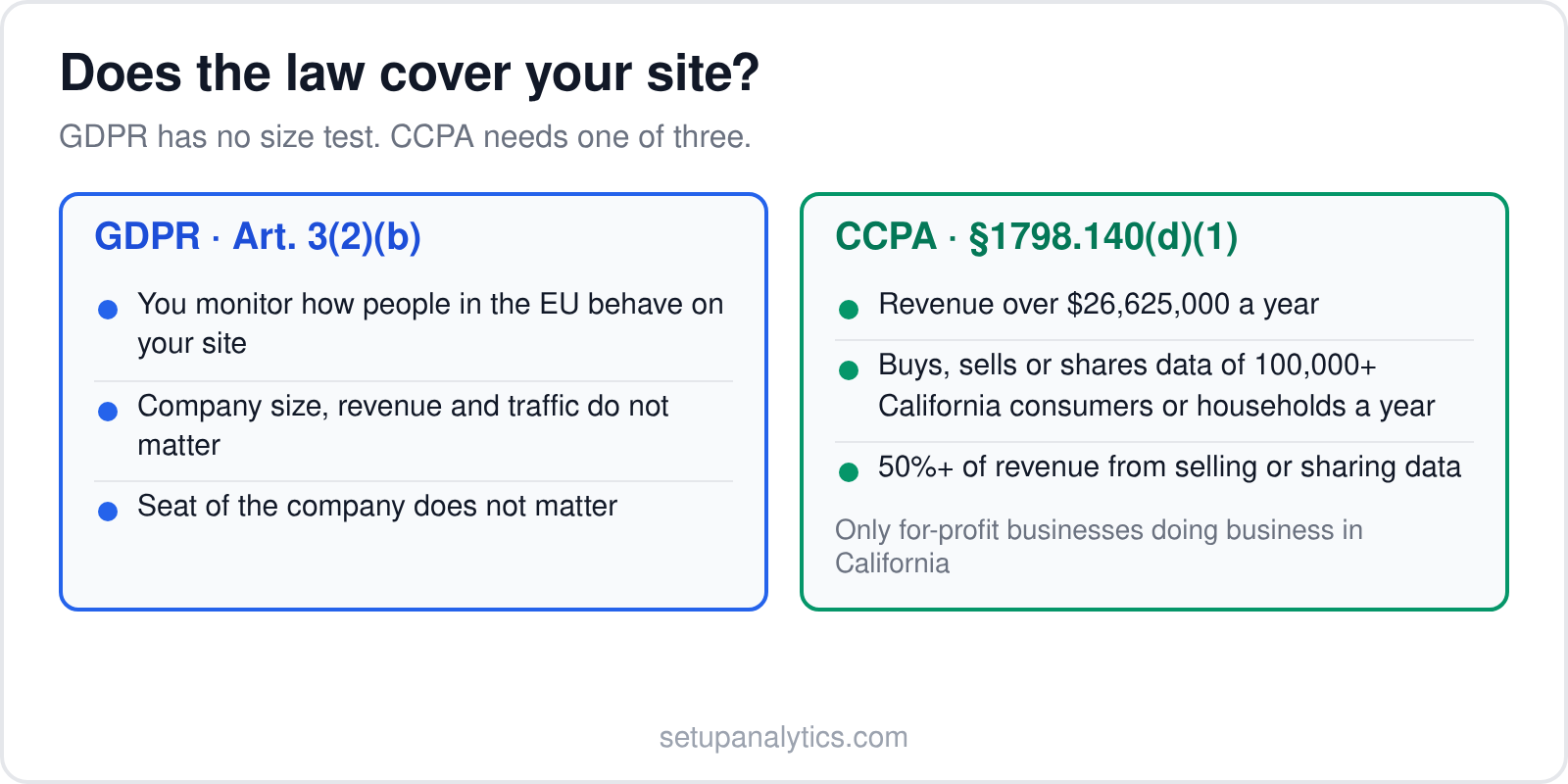
The GDPR has no size threshold. If your analytics monitors the behavior of people while they are in the EU, it applies even when your company is based somewhere else (Art. 3(2)(b)).
The CCPA is narrower. It covers you only if you run a for-profit business that does business in California and passes at least one of three tests (§1798.140(d)(1)):
- Annual gross revenue over $26,625,000 in the preceding calendar year, the original $25,000,000 as adjusted on 1 January 2025
- Buying, selling or sharing the personal information of 100,000 or more consumers or households a year
- Earning 50% or more of annual revenue from selling or sharing personal information
The second test is the one small sites miss. It counts the visitors whose data you sell or share, so ad tags on a busy site can pass 100,000 Californians with little revenue behind them.
If none of the three fits, and you are not part of a covered group of companies, the CCPA’s duties do not reach you. The GDPR still does, as soon as you track visitors in the EU.
FAQ
Is GDPR stricter than CCPA for analytics?
On timing and fines, yes. Consent comes before the first hit, and the ceiling is €20 million or 4% of worldwide turnover (Art. 83(5)). California is stricter in one place a GDPR setup can miss: it makes you process GPC and show that you did (11 CCR §7025).
Does a GDPR cookie banner cover California visitors?
Not on its own. The CCPA also asks for notice at collection (§1798.100(a)) and GPC handling for any business that sells or shares. If a visitor accepted your banner but browses with GPC on, the signal wins unless they confirm their choice again (11 CCR §7025(c)(3)).
What is the difference between CCPA and CPRA?
The CPRA is the California Privacy Rights Act of 2020, adopted by voters as Proposition 24. It amended the CCPA rather than replacing it, added “sharing”, sensitive personal information and the California Privacy Protection Agency. Most of its rules became operative on 1 January 2023.
Is Google Analytics legal under GDPR?
Yes, when it runs after consent and the transfer to the US has a legal basis. The adequacy decision of 10 July 2023 covers transfers to organizations on the Data Privacy Framework List. Check that your analytics vendor is on it.
Will the EU drop consent for analytics cookies?
Not yet. The Commission’s Digital Omnibus proposal of 19 November 2025 would let a site measure its own audience in aggregate without consent (COM(2025) 837, draft Art. 88a(3)(c)). On 2026-11-04 the Parliament file 2025/0360(COD) was still awaiting a committee decision.
Continue Learning
- Google Consent Mode v2 setup guide: the default and update calls behind the EU lane
- Session vs persistent cookies: which cookies trigger the consent rule in the first place
- Do Not Sell link template: the California opt-out page, ready to adapt
One setup for both laws
Deny by default where your banner shows, measure from the first page view elsewhere, and let GPC switch off the advertising signals for California. Then set a retention period and write the same number into your privacy notice.
That covers the questions both laws ask about your analytics. Revisit it when the Digital Omnibus or the 2027 browser rule changes the picture.
EU references come from the GDPR text in the Official Journal of the EU and the consolidated ePrivacy Directive. California references come from the CCPA statute and regulations published by the California Privacy Protection Agency, both effective 1 January 2026. CPI-adjusted amounts come from the Agency’s notice effective 1 January 2025. GA4 settings follow Google Analytics Help. Last verified 2026-11-04. Editorial research, not legal advice.