Tracking Setup
GA4 data filters: a practitioner guide
The four filter types, the prospective-only rule, RE2 vs PCRE differences, and the redact patterns operators reach for repeatedly.
Practitioner guide · GA4 admin
GA4 ships with four data-filter types and a regex flavour that most operators have never used before. This guide explains what each filter does, when to apply it, and the rules that quietly bite — including the prospective-only rule that costs newcomers a week of dirty data.
The four filter types in GA4
GA4 distinguishes between four categories of data filters under Admin → Data Settings → Data Filters. They are not interchangeable, and only one of them can be safely toggled in real time:
1. Internal traffic
Drops or labels events that come from IP ranges you have flagged as internal. You define the ranges in Admin → Property → Data Streams → Web stream → Configure tag settings → Show all → Define internal traffic. The filter then either excludes those events outright (state: Active) or tags them with a traffic_type parameter equal to internal (state: Testing). The tag-only state is useful when you want to compare filtered and unfiltered numbers in Explorations before flipping the switch.
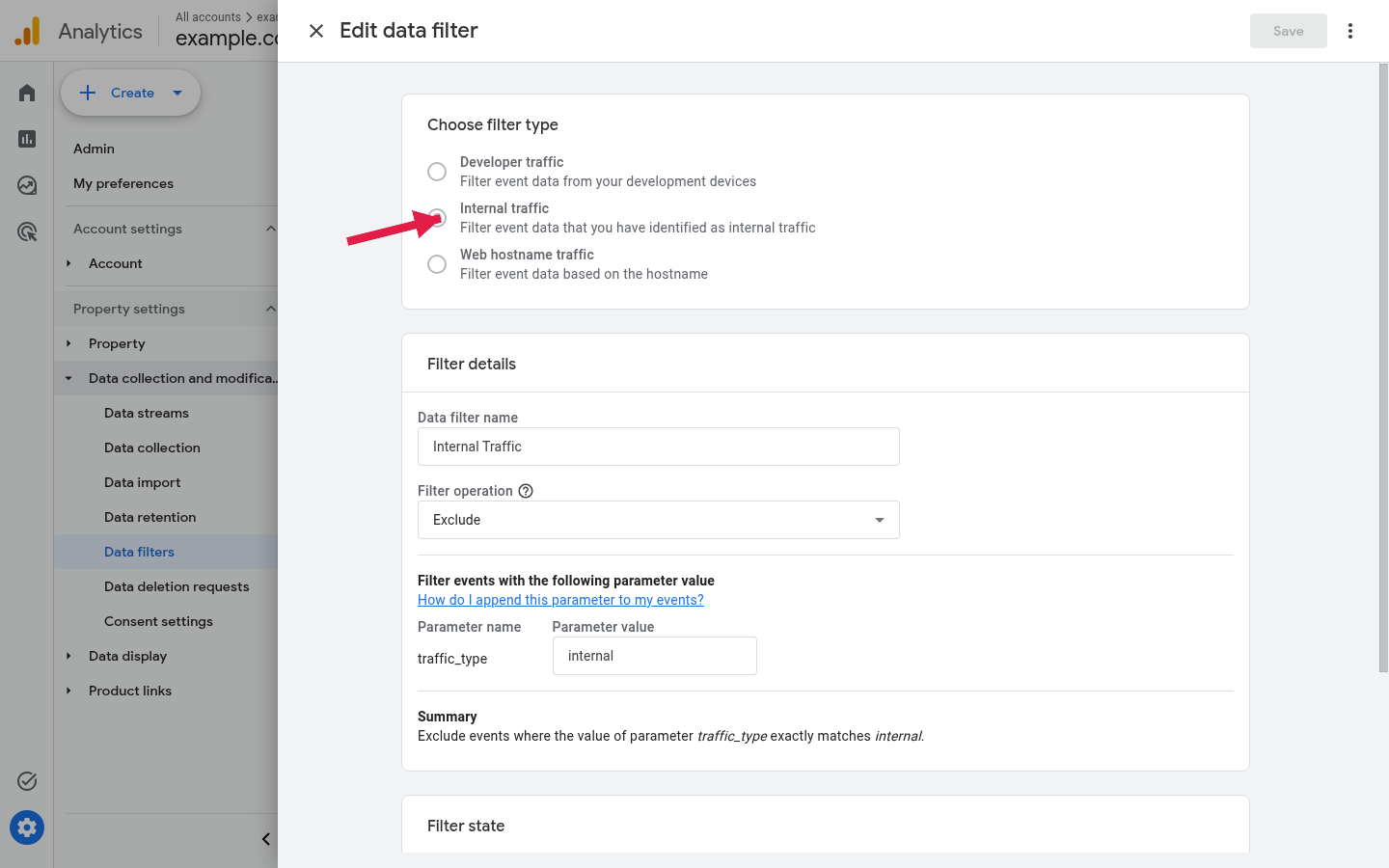
traffic_type parameter equals internal. The same panel chooses the filter type and the operation.2. Developer traffic
Drops events that arrive with the parameter debug_mode=1. This is what GA4’s DebugView feature relies on, and it is what the GTM Preview mode automatically appends. If you forget to enable this filter, every QA session pollutes production. Most operators turn it on permanently after the first time they discover a debug-tagged checkout in their conversion funnel.
3. Redact data
Removes URL parameters and query-string values that match a pattern, before they are written to GA4’s storage. This is the lawful-basis-saving filter: if your URLs accidentally carry email addresses, phone numbers, or any other identifier that is not supposed to be sent to a measurement system, this is where you strip them. It applies to page_location, page_referrer, and the URL-bearing parameters of every event GA4 collects.
4. Validation
An infrastructure-level safety net that drops events failing GA4’s own validation rules — for example, events with reserved parameter names, malformed identifiers, or mis-typed currency codes. Validation cannot be turned off; it is shown in the filter list for transparency only.
The rule that surprises everyone
Filters in GA4 apply prospectively only. There is no view-level backfill the way there was in Universal Analytics. Once a filter is set to Active, it affects events arriving from that moment forward. Events already in GA4’s storage are unchanged, and they will still appear in reports for as long as the property’s data-retention setting allows.
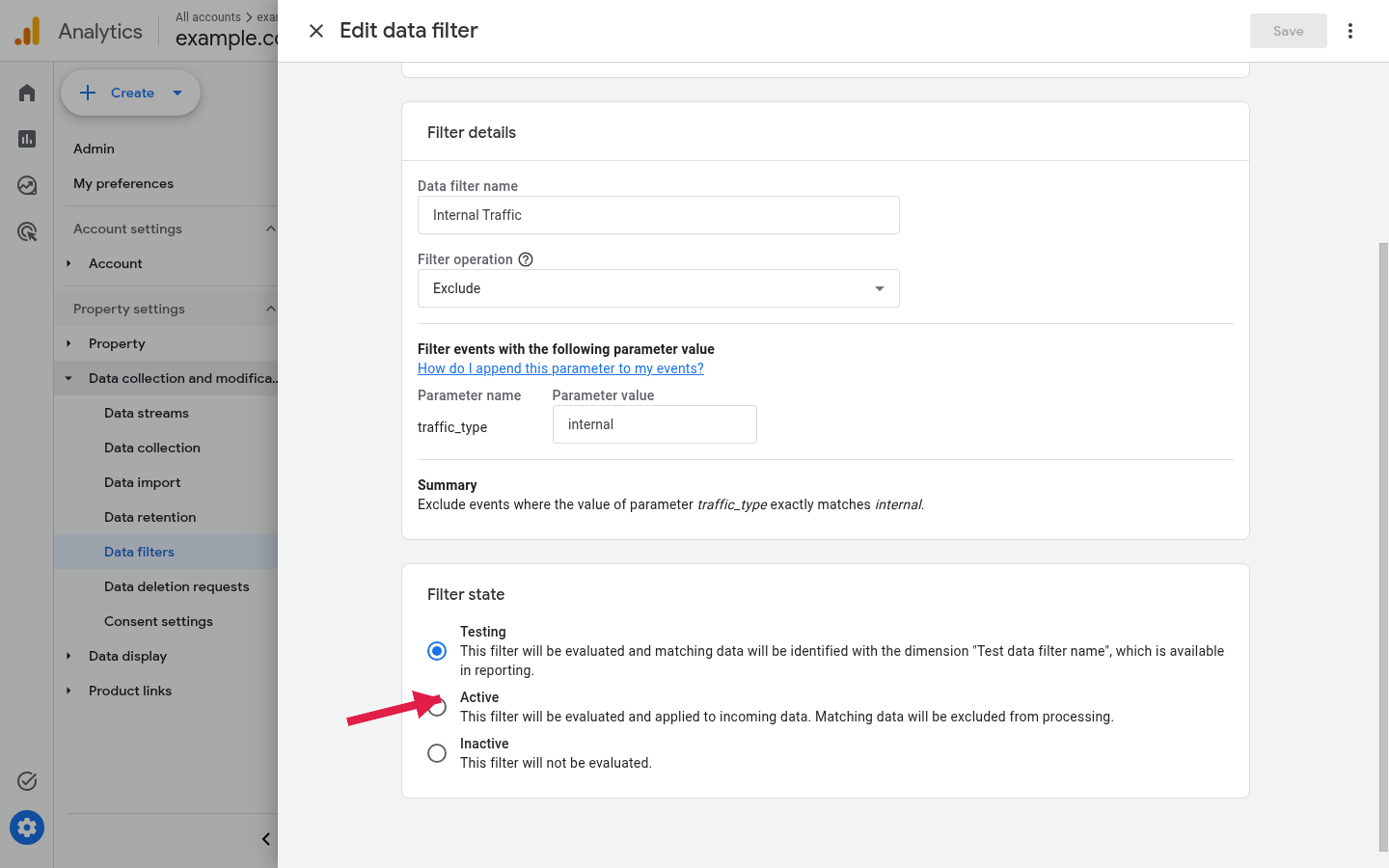
traffic_type=internal; only Active actually drops it from reports.The practical consequence: if you discover a week’s worth of internal traffic that is contaminating your conversion numbers, the GA4 filter will not retroactively clean it. You will need either to add a filtered comparison in every relevant Exploration (subset by traffic_type ≠ internal after you have started tagging), or to move to a BigQuery export where retroactive SQL filtering is possible.
RE2, not PCRE
Regex inside GA4 — not just data filters, but also custom dimensions, audience triggers, and Explorations — uses Google’s RE2 engine. RE2 is fast and DoS-safe, but it does not support every feature most regex users assume is universal. The differences that bite most often:
- No backreferences in matches. Patterns like
(\w+)\s+\1(find a repeated word) do not compile in RE2. Backreferences are only allowed in replacement syntax, which GA4 does not expose anyway. - No look-ahead or look-behind.
(?=...),(?!...),(?<=...), and(?<!...)all fail to compile. Workarounds usually involve restructuring the pattern with explicit alternation or a literal anchor, or moving the logic upstream into GTM where JavaScript regex (PCRE-like) is available. - Some Unicode classes differ.
\din RE2 matches only ASCII digits unless you opt into Unicode mode with(?U). PCRE’s default behaviour is wider. - Atomic groups and possessive quantifiers are unsupported. Patterns using
(?>...)orx++do not compile.
If a regex pattern works in your code editor or in a GTM custom JavaScript variable but rejects in GA4 with “invalid regular expression,” one of the four points above is almost always the cause. The Regex Builder for GA4 Filters tool on this site validates patterns against the RE2 subset in advance.
Practical patterns for the redact-data filter
Three patterns that operators reach for repeatedly:
- Email addresses anywhere in a URL parameter:
[A-Za-z0-9._%+-]+@[A-Za-z0-9.-]+\.[A-Za-z]{2,}. Configure the filter to redact matches in page_location and page_referrer at minimum. - E.164 phone numbers:
\+?[1-9]\d{1,14}. A loose pattern; tighten only if the source of the leak is known. - Internal user IDs that should not have left the database: a literal pattern like
uid=\d+redacts the value while preserving the URL structure for debugging.
The redact filter substitutes the matched substring with the literal string (redacted). It does not replace the entire field, which means partial redaction inside a longer URL is preserved.
Order of operations
When more than one filter is active, GA4 applies them in this order: validation, then internal-traffic exclusion, then developer-traffic exclusion, then redact-data. The order matters in a narrow case: if a redact pattern is supposed to scrub an internal-traffic IP from a referrer header, the referrer arrives at the redact filter after the internal-traffic decision has already been made on the source IP. Internal-traffic decisions are based on the request IP; redact rules act on event payload fields. They never collide.
What the filter list does not do
Several things operators expect to find under Data Filters but will not:
- Bot exclusion. GA4 applies its own bot-exclusion list in the background, derived from the IAB/ABC International Spiders & Bots List. There is no toggle, no exposed list, and no way to add custom bot signatures to it.
- Geographic exclusion. No filter excludes events by country. The closest available primitive is an audience definition combined with subset analysis in Explorations.
- Per-event-type filtering. Filters apply to all events arriving in the property. To suppress a single event type, the change must happen upstream in GTM or in the page-level tag.
- Per-property delete. Filters do not delete already-collected data. For that, use Admin → Data Settings → Data Deletion Requests, which has its own quota, latency (up to 63 days), and audit trail.
Auditing your current filter set
Once a quarter, the operator who runs the property should:
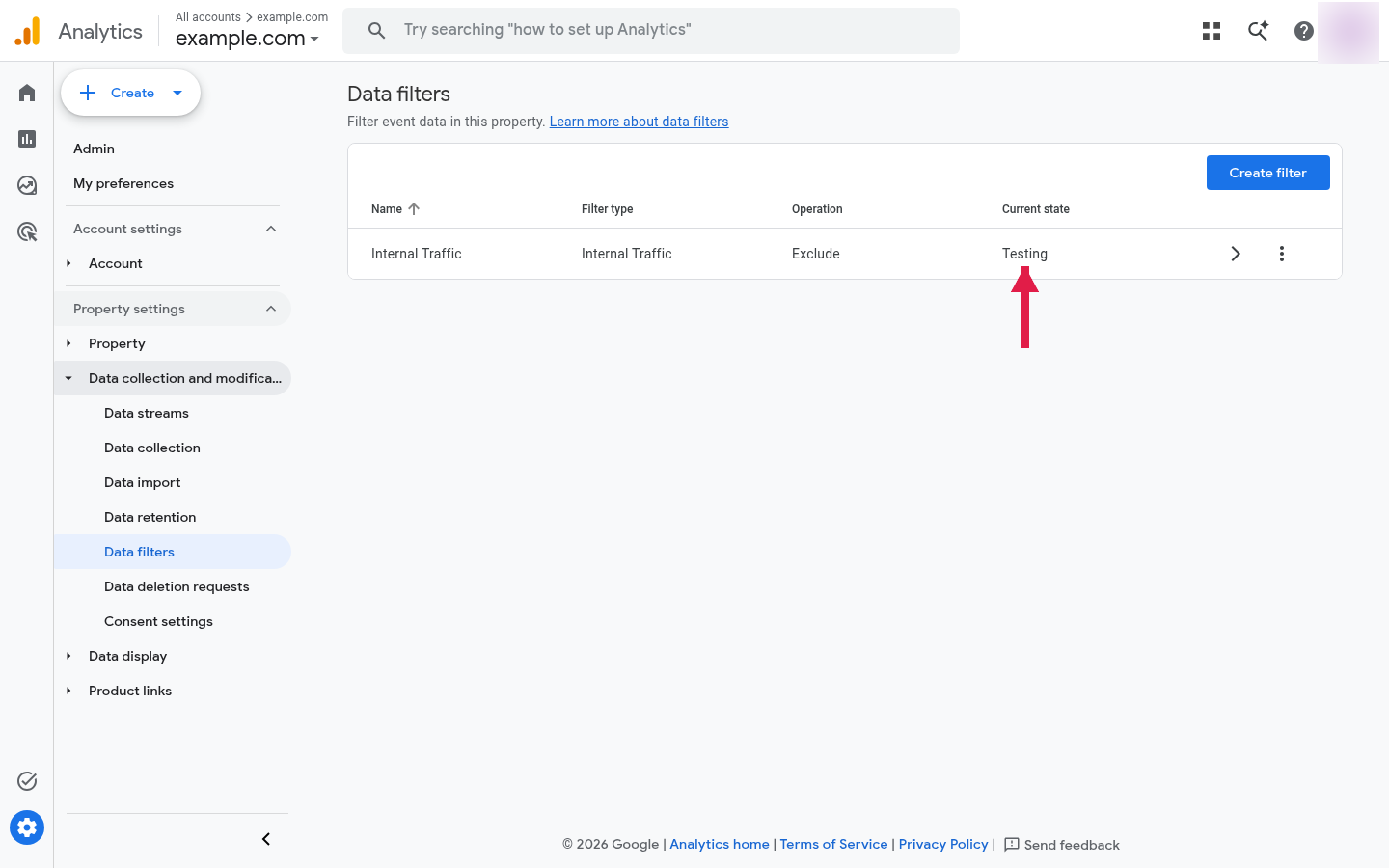
- Open Admin → Data Settings → Data Filters and screenshot the list with timestamps.
- Verify that Internal traffic is Active, not stuck in Testing.
- Verify that Developer traffic is Active.
- Re-run the redact patterns against a sample of last week’s
page_locationvalues exported from BigQuery. Patterns that no longer match anything are evidence that the upstream leak has been fixed; patterns that still match are evidence it has not. - Compare filter timestamps against the date of the last property-level configuration change. A filter newer than a year is rare; a filter newer than the last UA-to-GA4 migration is suspicious unless documented.
What this guide does not cover
Filters at the BigQuery export layer (where you can re-shape events before downstream consumption) are out of scope; they are SQL transformations, not GA4 admin controls. Looker Studio data-filter controls operate on already-exported data and are equally out of scope. Tag-level filtering in GTM — the upstream alternative for everything described above — is documented in the articles index under the GTM cluster.
This guide is editorial. The four filter types and the prospective-only rule are taken from Google’s “Configure data filters” Help Center page, last reviewed 2026-04-22. The RE2 syntax limitations are from the public RE2 specification at github.com/google/re2/wiki/Syntax. — M.K., 2026-05-07.