Analytics Integrations
Session vs Persistent Cookies: What Each Means for Consent
The difference between session vs persistent cookies comes down to one thing: when they die. A session cookie disappears the moment you close the browser. A persistent cookie sticks around until a date the site sets — sometimes minutes, sometimes years. That single distinction decides how long a site can remember you, and it maps directly onto the consent question every analytics setup eventually runs into: which of these actually needs a banner, and for how long?
From a practitioner’s perspective, the confusing part isn’t the definition. It’s that “session” and “persistent” describe a cookie’s lifetime, while “first-party” and “third-party” describe its origin — two completely separate axes that get mixed up constantly. This guide keeps them apart, ties cookie lifetime to the actual Set-Cookie attributes, and shows exactly which type triggers consent obligations, using Google Analytics as a concrete example.
The short answer
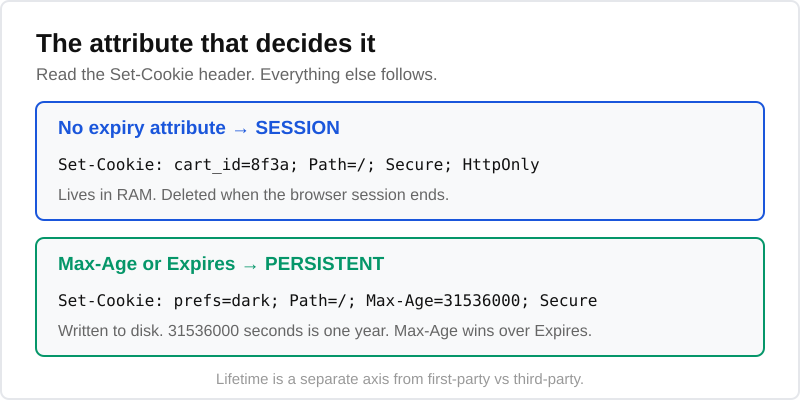
A session cookie has no expiry date. The browser holds it in memory and deletes it when the browser session ends — typically when you close the browser (or the last tab for that site). A persistent cookie carries an Expires date or a Max-Age value, so the browser writes it to disk and keeps it across browser sessions until that time runs out.
That’s the whole mechanism. Everything else — consent, GA4’s behaviour, the first-party confusion — flows from whether the cookie has an expiry attribute or not.
What a session cookie is
A session cookie exists only for the duration of a browser session. Technically, it’s a cookie the server sets without an Expires or Max-Age attribute. Because there’s no expiry, the browser treats it as temporary: it lives in memory, travels with each request to the same site, and is wiped when you quit the browser.
Here’s what one looks like coming back from a server, per the MDN Set-Cookie reference:
Set-Cookie: cart_id=8f3a; Path=/; Secure; HttpOnlyNo date, no Max-Age — so it’s a session cookie. This is exactly the kind of cookie a shopping cart, a logged-in state, or a CSRF token relies on. You want it gone when the visit ends, both for security and because there’s no reason to keep it.
Edge case worth knowing: “Close the browser” isn’t always the trigger. Chrome and Edge have a “Continue where you left off” setting that restores tabs and their session cookies on restart, so a session cookie can outlive the literal window-close. The rule is still “ends with the session” — the browser just defines the session more generously than you’d expect.
What a persistent cookie is
A persistent cookie is any cookie with an explicit lifetime. The server adds either an absolute Expires timestamp or a relative Max-Age in seconds, and the browser saves the cookie to disk so it survives restarts until that moment passes.
Set-Cookie: prefs=dark; Path=/; Max-Age=31536000; SecureThat Max-Age=31536000 is one year in seconds. Until then, the cookie comes back on every visit, even after you’ve closed and reopened the browser a hundred times. Max-Age takes priority over Expires when both are present, and it’s the attribute that actually defines how long the cookie persists.
Persistent cookies are what power “remember me” logins, language preferences, A/B test bucketing, and — critically for this site’s readers — analytics identifiers. Anything that needs to recognise a returning visitor across days or months has to be persistent, because a session cookie simply won’t be there next time.
Session vs persistent: side-by-side
Here’s the comparison in one place. Notice that the expiry row is the root cause and every other row is a consequence of it.
| Session cookie | Persistent cookie | |
|---|---|---|
| Expiry | None — ends with the browser session | Set via Expires date or Max-Age seconds |
| Stored | In browser memory (RAM) | Written to disk |
| Survives restart? | No (barring tab-restore settings) | Yes, until expiry |
| Typical use | Cart, login state, CSRF token | Preferences, “remember me”, analytics IDs |
| Set by | First or third party | First or third party |
| Needs consent? | Only if non-essential | Usually yes if used for analytics/ads |
| GA4 example | None — GA4 uses persistent cookies | _ga (2 years), _ga_<id> (2 years) |
The “Set by” row is deliberate: both types can be first-party or third-party. That’s the confusion worth clearing up next.
Lifetime is not the same as first vs third-party
This trips up almost everyone, so let’s be precise. Cookies are described on two independent axes:
- Lifetime — session or persistent. Answers “how long does it last?”
- Origin — first-party or third-party. Answers “who set it?”
A first-party cookie is set by the domain in the address bar (the site you’re actually visiting). A third-party cookie is set by a different domain loaded on the page — an ad network, an embedded widget, a tracker. The two axes combine freely, which means all four pairings exist:
- First-party session — a cart cookie on the shop you’re browsing.
- First-party persistent — GA4’s
_ga, set by the site you’re on, lasting two years. - Third-party session — a short-lived widget cookie from another domain.
- Third-party persistent — a classic cross-site ad-tracking cookie (the kind browsers are now killing off).
So “persistent” does not mean “third-party,” and “session” does not mean “safe.” A first-party persistent analytics cookie can still need consent; a third-party session cookie might not, if it’s strictly necessary. Get the axes straight and the consent logic becomes much easier to reason about. If you’re weighing whether to avoid this category altogether, our piece on analytics without cookies walks through the alternatives.
Which ones need consent (and why)
Here’s where lifetime starts to matter for compliance. Under the EU’s ePrivacy Directive — the law that actually governs cookies, sitting alongside the GDPR — you need prior consent before storing or reading any cookie that isn’t strictly necessary for the service the user explicitly requested.
The test isn’t “session or persistent.” It’s “essential or not.” But lifetime is the strongest practical signal, because of why each type tends to exist:
- Strictly necessary (no consent needed): cookies without which the site can’t function — cart contents, login session, load-balancing, security tokens. These are usually first-party session cookies. The GDPR cookie guidance exempts exactly this category.
- Non-essential (consent required): analytics, advertising, personalisation, A/B testing. These almost always rely on persistent cookies, because they need to recognise a returning visitor over time. That’s why the persistent analytics cookie is the one your cookie banner requirements are really about.
And here’s the part peers leave out: cookie lifetime should inform your stated retention period. If your cookie policy lists a cookie with a two-year Max-Age, your consent record and policy disclosure need to reflect that two-year horizon — not imply the data vanishes at the end of the visit. A session cookie can be honestly described as “deleted when you close your browser.” A persistent one cannot.
Practitioner note: consent isn’t only about whether the cookie fires — it’s about durability. A persistent analytics cookie that respects a denial should not be written at all until consent is granted. This is precisely what Consent Mode handles: see our consent mode setup for the GTM wiring that keeps GA4’s persistent cookies dormant until the visitor says yes.
What cookies does GA4 set?
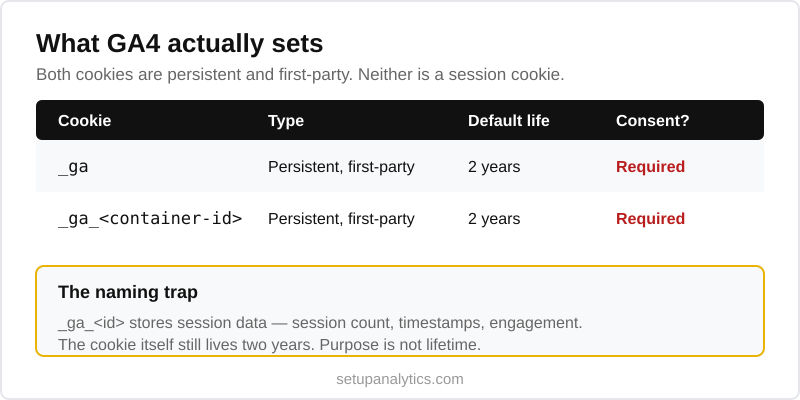
Google Analytics is the clearest real-world example, and it answers the question most readers actually have. GA4 uses persistent first-party cookies — not session cookies. Per Google’s own cookie usage documentation:
| Cookie | Type | Default lifetime | Purpose |
|---|---|---|---|
_ga |
Persistent, first-party | 2 years | Distinguishes unique users (the client ID) |
_ga_<container-id> |
Persistent, first-party | 2 years | Persists session state for that specific property |
Note the naming irony: the _ga_<id> cookie holds session information — session count, timestamps, engagement — but it is itself a persistent cookie. The data inside it is about the session; the cookie’s lifetime is two years. That’s the lifetime-versus-purpose distinction in a single example. (You can shorten the two-year default in GA4’s data-retention and cookie settings, but the cookie remains persistent, just shorter-lived.)
Because both _ga cookies are persistent and serve analytics, they fall squarely on the consent-required side of the line. In practice that means: don’t let GA4 write them before the visitor accepts, and disclose the two-year lifetime in your policy. If you’d rather sidestep the obligation entirely, a cookieless or privacy-first stack avoids persistent analytics cookies by design — something we cover in the cookieless strategies guide and the Umami review.
Frequently asked questions
What is the difference between a session cookie and a persistent cookie?
A session cookie has no expiry attribute, so the browser keeps it in memory and deletes it when the browser session ends. A persistent cookie carries an Expires date or a Max-Age value, so the browser saves it to disk and keeps it across restarts until that time passes. The presence or absence of an expiry attribute is the entire difference — session cookies are for temporary state like a cart, persistent cookies are for anything that must be remembered over time, such as preferences or analytics IDs.
Do session cookies need consent?
Only if they’re non-essential. Under the ePrivacy Directive, consent depends on whether a cookie is strictly necessary for the service the user requested, not on its lifetime. A first-party session cookie holding cart contents or a login state is exempt. But a session cookie used for analytics or advertising would still require consent. In practice most session cookies are functional and exempt, while most consent-triggering cookies turn out to be persistent.
How long does a persistent cookie last?
Exactly as long as its Max-Age or Expires attribute specifies — set by the site, not the browser. It can be anything from a few minutes to years. GA4’s _ga cookie defaults to two years, a “remember me” login might last 30 days, and a consent-record cookie often lasts 6 to 12 months. Browsers may cap or shorten some lifetimes (Safari’s ITP limits certain script-set cookies to 7 days), but the site’s declared value is the starting point.
Is a session cookie the same as a first-party cookie?
No — they describe different things. “Session” versus “persistent” is about lifetime: how long the cookie lasts. “First-party” versus “third-party” is about origin: which domain set it. A cookie can be any combination of the two. For example, GA4’s _ga is a first-party persistent cookie, while a cart cookie is usually a first-party session cookie. Don’t assume one implies the other.
Which cookies does Google Analytics set — session or persistent?
GA4 sets persistent first-party cookies, not session cookies. The _ga cookie (the client ID that distinguishes users) and the _ga_<container-id> cookie (which stores session state for a property) both default to a two-year lifetime and are written to disk. Despite the second one tracking session-level data, the cookie itself is persistent. Because they serve analytics, both require consent under the ePrivacy Directive.
Continue Learning
Explore the rest of the privacy and consent cluster:
- Cookie banner requirements — what your consent banner actually has to do, and for which cookies.
- ePrivacy Directive — the law behind cookie consent in the EU, and how it sits next to the GDPR.
- Consent mode setup — keep GA4’s persistent cookies dormant until the visitor agrees.
- Cookieless strategies — measure without relying on persistent analytics cookies at all.
Bottom line
Session vs persistent cookies is a lifetime distinction, not a privacy verdict: a session cookie ends with the browser session, a persistent cookie lives until its Max-Age or Expires date. Keep that axis separate from first-party versus third-party, and the consent picture clears up fast. Strictly necessary cookies — usually session — are exempt; non-essential ones — usually persistent, like GA4’s two-year _ga — need consent and an honest lifetime disclosure in your policy. Get the attributes right at the source, and the compliance side mostly takes care of itself.